
FlowSync turns WooCommerce Memberships plan events into CRM or email automation. New members, purchase-granted access, cancellations, and expirations can each automatically move a contact between CRM lists.
What you’ll need
- WooCommerce and WooCommerce Memberships installed and active.
- An integration already connected in FlowSync (Integrations).
Available triggers
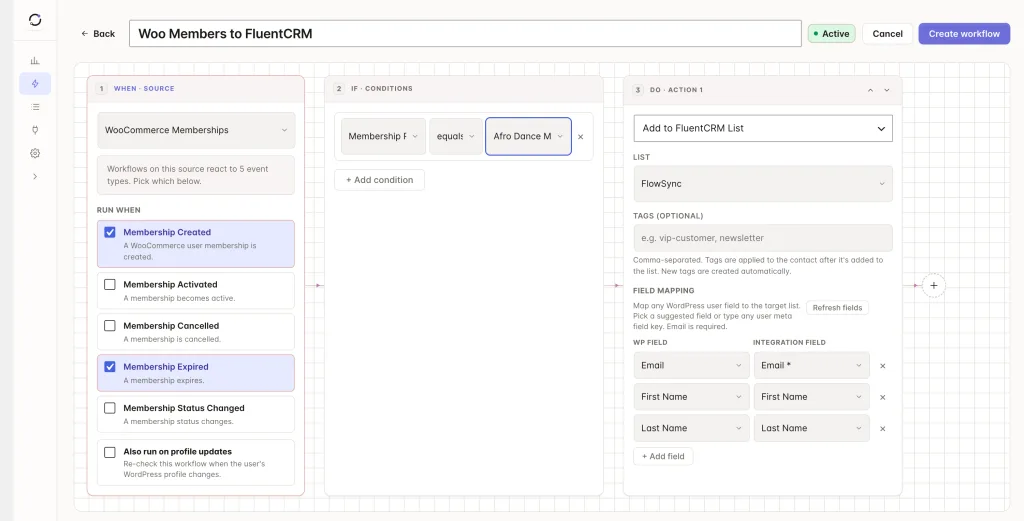
- Membership Created — a WooCommerce user membership is created. Default on.
- Membership Activated — a membership becomes active, including complimentary memberships.
- Membership Canceled — a membership is canceled.
- Membership Expired — a membership expires. Default on.
- Membership Status Changed — a membership status changes for any other reason.
Step 1: Create a workflow
Go to FlowSync > Workflows and click Add New. Give it a name, for example, “New WC members to Klaviyo.”
Step 2: Choose WooCommerce Memberships as the source
Under trigger source, select WooCommerce Memberships, then pick a trigger such as Membership Created or Membership Expired. Add a condition using Membership Plan or Membership Status if needed.
Step 3: Add your CRM action
Under Actions, choose your connected CRM. Use Add to List for new or active members, or Remove from List for canceled or expired ones.
Step 4: Map your fields
| Source field | Maps to |
|---|---|
| Contact email | |
| First/Last Name | First/last name |
| Membership Plan Name | Custom field or tag |
| Membership Status | Custom field or tag |
Every event carries membership_id, plan_id, plan_name, and membership_status. Status-change events also carry old_status and new_status.
Free keeps the field mapper scoped to core identity fields. FlowSync Pro unlocks the full set: WooCommerce Membership Details (Membership ID, Plan ID/Name, Status, Old/New Status), Purchase Details (Order ID, Product ID), and Billing/Shipping Details from the order that granted the membership.
Save the workflow, then set it to Active.
If something goes wrong
Grant a test membership through a purchase, or manually from WooCommerce > Members, then check FlowSync > Logs for the run.
- New membership doesn’t appear in the CRM. Confirm the workflow is Active. Purchases, admin actions, and plan updates all route through Membership Created.
- Status shows a
wcm-prefix somewhere. FlowSync normalizes that prefix before it reaches conditions and fields, so mapped values should readactive,expired,cancelled. Check the specific run in Logs if you see the raw prefix. - Expired members stay on active CRM lists. Add a second workflow with the Membership Expired trigger and a Remove from List action.
- Billing or shipping fields are blank. Only purchase-granted memberships carry order billing/shipping data. A membership granted manually with no linked order won’t have it.
Still need help? Contact our support team, and we’ll help you get it working.