
FlowSync turns ProfilePress subscription events into CRM or email automation. New members, trial starts, renewals, and cancellations can all push or pull a contact from your CRM lists, without a manual export.
What you’ll need
- ProfilePress installed and active, with at least one membership plan set up.
- An integration already connected in FlowSync (Integrations).
Available triggers
- Subscription Created — a subscription becomes active or starts a trial. Default on.
- Subscription Activated — a subscription is activated.
- Subscription Trialing — a subscription enters a trial period.
- Subscription Completed — a subscription finishes its full payment cycle.
- Subscription Renewed — a renewal payment is recorded.
- Subscription Expired — a subscription reaches its expiry date. Default on.
- Subscription Canceled — a subscription is canceled.
- Subscription Status Changed — a subscription’s status changes for any reason.
Step 1: Create a workflow
Go to FlowSync > Workflows and click Add New. Give it a name, for example, “New ProfilePress members to FluentCRM.”
Step 2: Choose ProfilePress as the source
Under trigger source, select ProfilePress, then pick a trigger such as Subscription Created or Subscription Canceled. Add a condition using Membership Plan or Membership Status if needed.
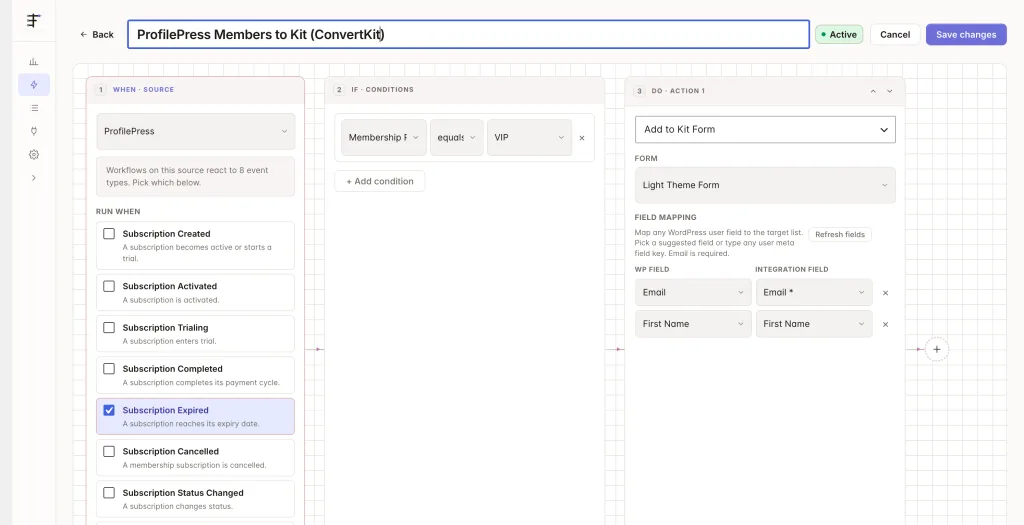
Step 3: Add your CRM action
Under Actions, choose your connected CRM. Use Add to List for new members, or Remove from List for canceled or expired ones.
Step 4: Map your fields
| Source field | Maps to |
|---|---|
| Contact email | |
| First/Last Name | First/last name |
| Plan Name | Custom field or tag |
| Subscription Status | Custom field or tag |
Every event carries subscription_id, customer_id, plan_id, plan_name, and subscription_status. Cancellation and status-change events also carry old_status and new_status.
On FlowSync Pro, the field picker adds ProfilePress · Membership (Plan ID(s)/Name(s), Status, Subscription ID(s), Start Date, Expiry Date, Renewal Date, Billing Amount) and ProfilePress · Billing (Billing Phone, Address, City, State, Postcode, Country, its own ppress_billing_* fields, not WooCommerce’s).
ProfilePress has no dedicated “created” hook separate from activation or trial start, so a brand-new paid member triggers both Subscription Created and Subscription Activated.
Save the workflow, then set it to Active.
If something goes wrong
Sign up a test account for a plan, or start a trial if one of your plans offers it, then check FlowSync > Logs for the run.
- New member doesn’t appear in the CRM. Confirm the workflow is Active and the trigger is Subscription Created, not a later-stage event.
- Trial signups aren’t syncing separately. Use Subscription Trialing if you want trial users tagged differently. It fires alongside Subscription Created on a trial start.
- Canceled members stay on active CRM lists. Add a second workflow with the Subscription Canceled trigger and a Remove from List action.
- Renewal payments don’t trigger anything. Use Subscription Renewed. It only fires on the renewal payment, not the initial signup.
Still need help? Contact our support team and we’ll help you get it working.