
FlowSync turns Easy Digital Downloads (EDD) order activity into CRM or email automation. Customers land in your CRM when a purchase completes, and renewals and refunds can trigger tags, list moves, or follow-up emails.
Easy Digital Downloads is a free FlowSync source. Install both plugins, and the trigger shows up; no license needed.
What you’ll need
- Easy Digital Downloads installed and active.
- FlowSync installed and active.
- An integration already connected in FlowSync (Integrations).
Available triggers
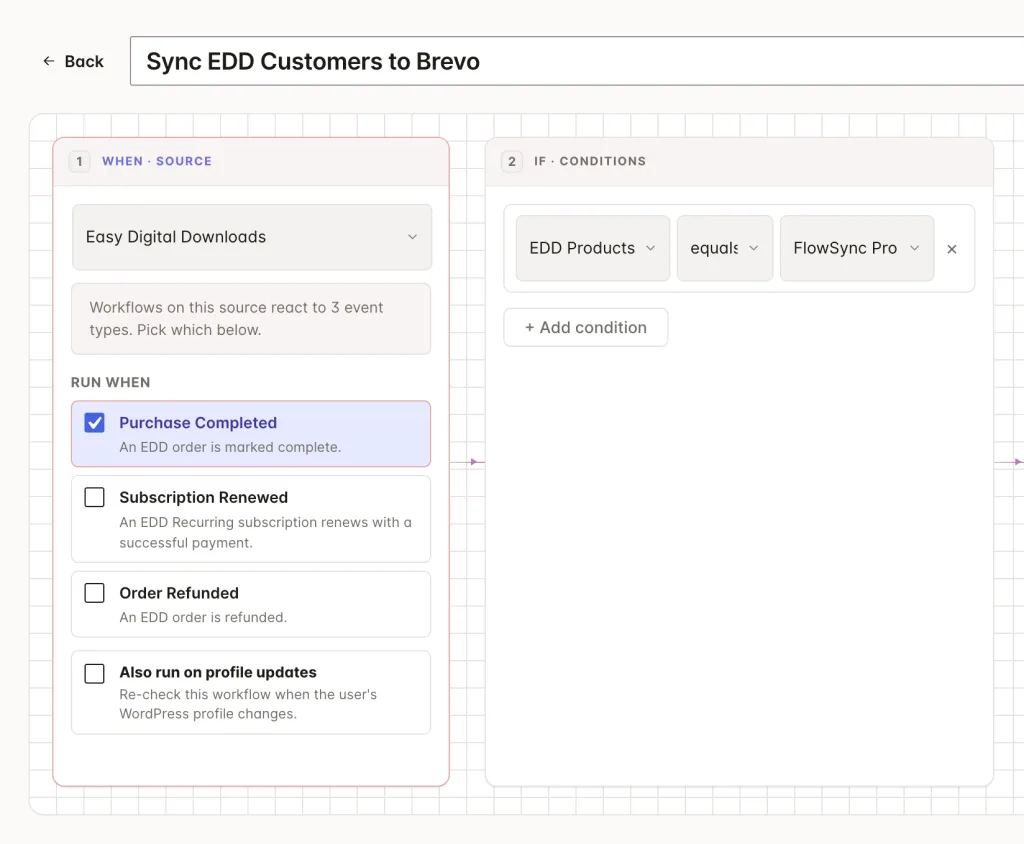
- Purchase Completed: an order is marked complete. Includes the purchased downloads, total, and currency.
- Subscription Renewed: a recurring subscription renews with a successful payment. Requires the EDD Recurring Payments add-on.
- Order Refunded: An order has been refunded.
Events fire for the customer’s WordPress account. If a guest checks out without an account, FlowSync matches the order to an existing account by email; orders with no matching account are skipped.
Step 1: Create a workflow
Go to FlowSync > Workflows and click Add New. Give it a name, for example, “EDD customers to Brevo.”
Step 2: Choose Easy Digital Downloads as the source
Under trigger source, select Easy Digital Downloads, then pick a trigger such as Purchase Completed. Add a condition if you only want a subset, for example EDD Products equals a specific download, or EDD Order Total greater than 100.
Step 3: Add your CRM action
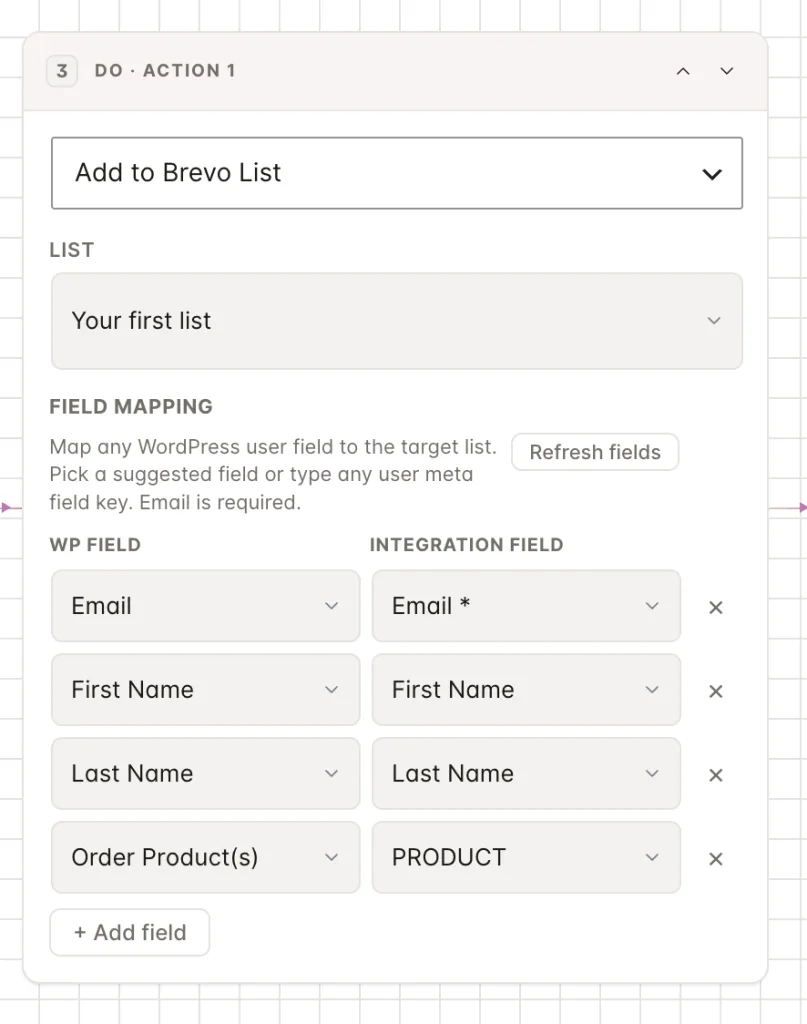
Under Actions, select your connected CRM and choose an action, such as Add to List or Add Tag.
A common setup is one workflow per product line: a Purchase Completed trigger with an EDD Products condition that adds buyers of that download to its own list or tag. Pair it with an Order Refunded workflow that runs the matching Remove from List action.
Step 4: Map your fields
Standard identity fields (email, first name, last name) map like any other source. With FlowSync Pro active, EDD also contributes its own mapping fields, grouped in the field picker under EDD · Customer and EDD · Order.
| Group | Fields |
|---|---|
| Customer | Customer ID, lifetime purchase count, lifetime value, customer since, purchased download IDs and names |
| Order | Order ID, total, currency, status, products, and subscription ID |
Customer fields read live from the EDD customer record, so lifetime value and purchase count populate even on a manual run with no event context. Order fields use the triggering order. Product and order targeting still happens via conditions, so a single workflow can serve either a single download or the whole store.
Save the workflow, then set it to Active.
If something goes wrong
Run a test purchase and check FlowSync > Logs for the run before assuming something’s broken.
- Trigger source doesn’t show Easy Digital Downloads. EDD isn’t active, or FlowSync requires a page reload after activation.
- Guest purchases don’t sync. Expected when the guest’s email doesn’t match any WordPress account. EDD stores let customers buy without accounts; FlowSync only syncs orders it can tie to a user. Enable EDD’s auto-register option to sync every buyer.
- Subscription Renewed never fires. It needs the EDD Recurring Payments add-on. The initial subscription purchase fires Purchase Completed; only later renewals fire Subscription Renewed.
- Refund workflow didn’t remove the contact. Check the workflow uses an explicit Remove from List action. FlowSync never auto-reverses an earlier add; removals are always their own action.
Selling with WooCommerce or SureCart instead? FlowSync supports both sources. New to FlowSync? Start with your first workflow in five steps, or browse the rest of the documentation.
Still need help? Contact our support team, and we’ll help you get it working.