FlowSync fires a workflow every time a student enrolls in, completes, or leaves a LearnDash course or group. Use it to add new students to an onboarding sequence, tag course completions in your CRM, or clean up access-based tags when someone unenrolls.
What you’ll need
- LearnDash installed and active.
- An integration already connected in FlowSync (Integrations).
Available triggers
- Course Enrolled — a user is enrolled in a course. Default on.
- Course Unenrolled — a user is removed from a course.
- Course Completed — a user completes a course. Default on.
- Group Enrolled — a user is added to a group.
- Group Unenrolled — a user is removed from a group.
Step 1: Create a workflow
Go to FlowSync > Workflows and click Add New. Give it a name, for example, “Course completions to Mailchimp.”
Step 2: Choose LearnDash as the source
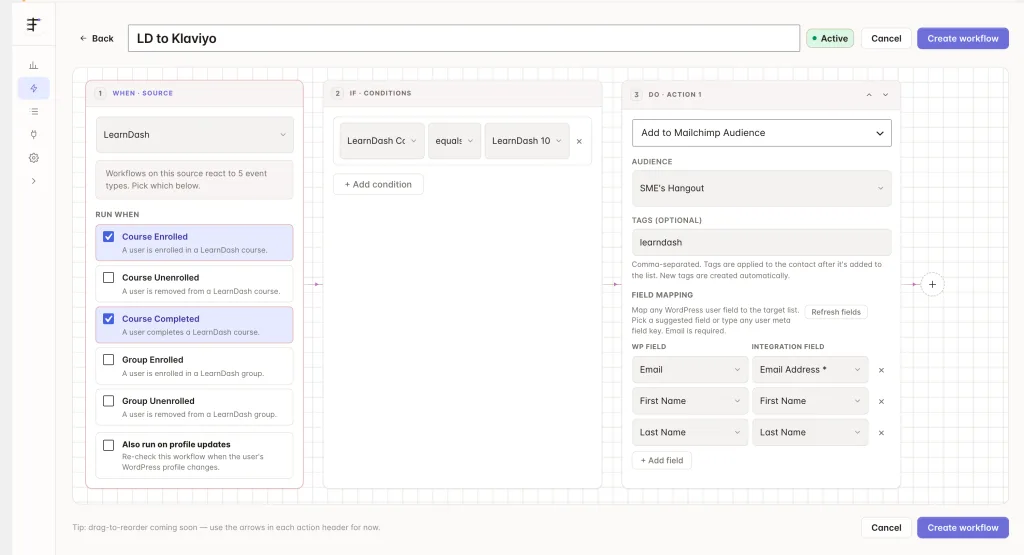
Under trigger source, select LearnDash, then pick a trigger such as Course Completed. Add a condition using LearnDash Courses or LearnDash Groups if you only want specific ones.
Step 3: Add your CRM action
Under Actions, select your connected CRM and choose an action, such as Add to List or Add Tag.
Step 4: Map your fields
| Source field | Maps to |
|---|---|
| Contact email | |
| First/Last Name | First/last name |
| Course ID / Title | Custom field or tag |
| Group ID / Title | Custom field or tag |
Email and name resolve the same as any other source. Every event also carries course_id, course_title, group_id, group_title, and status (enrolled, unenrolled, or completed).
On FlowSync Pro, the field picker adds a full LearnDash · Courses & Groups group: Enrolled Course ID(s)/Name(s)/Count, Completed Course ID(s)/Name(s)/Count, Group ID(s)/Name(s)/Count, and the triggering course/group/status. These reflect the student’s current state, not just the event that fired.
Save the workflow, then set it to Active.
If something goes wrong
Enroll a test user in a course, or mark it complete for them, then check FlowSync > Logs for the run.
- The workflow doesn’t fire. Confirm LearnDash is active and the workflow is Active, not just saved.
- Group enrollment doesn’t match a course condition. Course and group events use separate condition fields. Use LearnDash Groups, not LearnDash Courses, for group workflows.
- Manual re-run processes every WordPress user, not just students. LearnDash’s manual run pages through all site users and relies on your workflow’s conditions to filter them. Add a course or group condition to keep it fast on a large site.
- Completed Course fields are empty right after enrollment. They only populate once LearnDash records a completion timestamp for that course.
Still need help? Contact our support team, and we’ll help you get it working.