
FlowSync turns AffiliateWP affiliate and referral events into CRM or email automation. New affiliates land in your CRM the moment they register, and referral activity can trigger tags, list moves, or follow-up emails.
AffiliateWP is a FlowSync Pro source. The free plugin doesn’t ship it, so you need FlowSync Pro active before the AffiliateWP trigger and fields show up.
What you’ll need
- AffiliateWP installed and active.
- FlowSync Pro installed and licensed.
- An integration already connected in FlowSync (Integrations).
Available triggers
- Affiliate Registered — a new affiliate is created, at any status, including pending review.
- Affiliate Approved — an affiliate’s status is set to active.
- Affiliate Status Changed — status changes to active, pending, inactive, or rejected.
- Referral Earned — a referral or commission is accepted for an affiliate.
- Referral Paid — a referral is marked paid.
- Referral Status Changed — status changes to unpaid, paid, pending, rejected, or draft.
Events fire for the affiliate’s own WordPress account, never the referred customer.
Step 1: Create a workflow
Go to FlowSync > Workflows and click Add New. Give it a name, for example “New AffiliateWP affiliates to Brevo.”
Step 2: Choose AffiliateWP as the source
Under trigger source, select AffiliateWP, then pick a trigger such as Affiliate Approved or Referral Earned. Add a condition if you only want a subset, for example, Affiliate Status equals active or Referral Amount greater than 50.
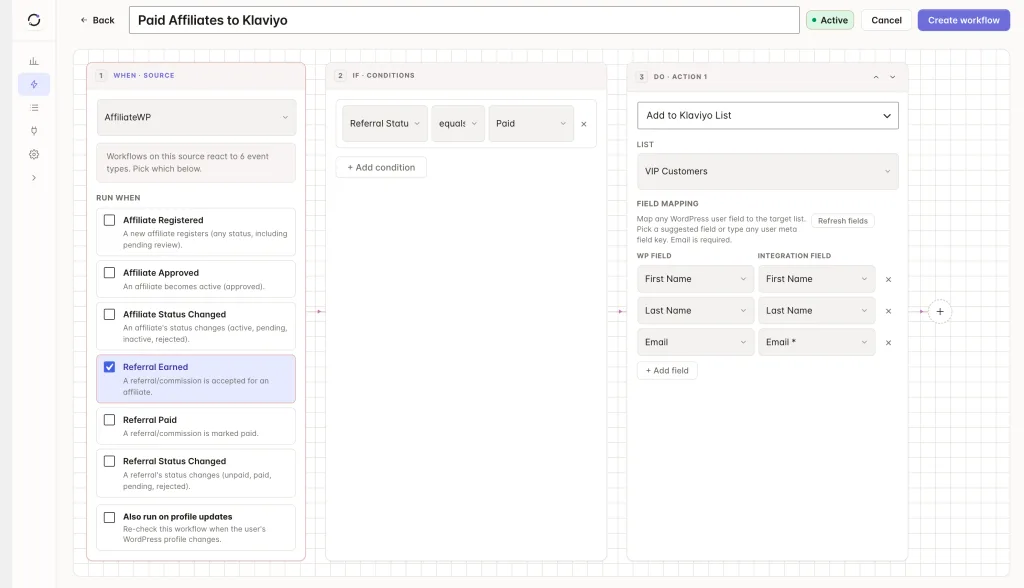
Step 3: Add your CRM action
Under Actions, select your connected CRM and choose an action, such as Add to List.
Step 4: Map your fields
| Source field | Maps to |
|---|---|
| Contact email | |
| Affiliate Name | First/last name |
| Affiliate Status | Custom field or tag |
| Total Earnings | Custom field |
| Last Referral Amount | Custom field |
Standard identity fields map like any other source. AffiliateWP-specific fields live under AffiliateWP · Affiliate and AffiliateWP · Referral in the field picker: Affiliate ID, Affiliate Status, Referral URL, Referral Rate, Total Earnings, Unpaid Earnings, Referral Count, Visit Count, Registration Date, Payment Email, and the Last Referral amount/status/reference/context.
Save the workflow, then set it to Active.
If something goes wrong
Run a real affiliate action (register or approve a test affiliate) and check FlowSync > Logs for the run before assuming something’s broken.
- Trigger source doesn’t show AffiliateWP. FlowSync Pro isn’t active or licensed, or AffiliateWP itself isn’t active.
- Workflow doesn’t fire for an affiliate added in wp-admin. It should. FlowSync listens to AffiliateWP’s insert hook, which also covers admin-added affiliates. Confirm the workflow is Active and the trigger matches the event.
- Referral fields are blank in the CRM. Referral-level fields only resolve when there’s a referral to read. A brand-new affiliate with no referrals yet will have empty referral fields.
- Same contact syncs twice for one referral. Check for overlapping Referral Earned and Referral Status Changed workflows; Referral Status Changed fires on every transition, including the one that also fires Referral Paid.
Still need help? Contact our support team, and we’ll help you get it working.