Email is still the channel that pays. Litmus, in its State of Email research, puts the average return at about $36 for every $1 spent, ahead of every other channel it measures. And email isn’t slowing down: roughly 361 billion emails were sent each day in 2024, a figure expected to exceed 390 billion (Statista, citing Radicati Group data). A large share of the people sending those emails use WordPress, which still runs about 42% of all websites as of mid-2026 (W3Techs), down slightly from its 2025 peak but far ahead of any other CMS.
So the question isn’t whether to do email marketing on your WordPress site. It’s which tool to run it with. This guide walks through the plugins worth considering in 2026, what each does well, where each gets awkward or expensive, and who it actually fits.
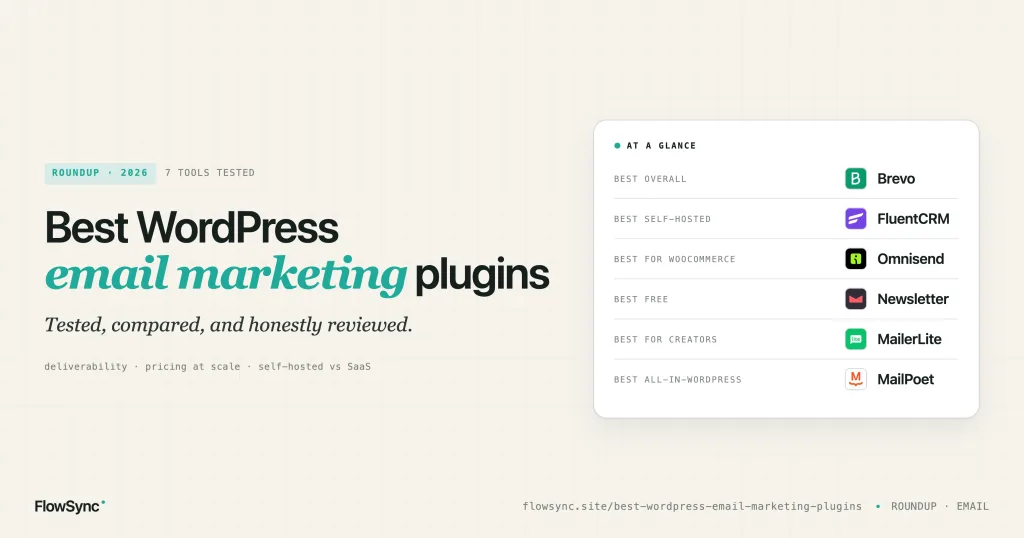
At a glance
| If you want | Pick |
|---|---|
| Best overall | Brevo |
| Best self-hosted | FluentCRM |
| Best for WooCommerce | Omnisend |
| Best free | The Newsletter plugin |
| Best for creators | MailerLite |
| Best all-in-WordPress | MailPoet |
Full reasoning for each is below, along with five more tools worth a look.
Two things changed since the last guide you read
Open rates are no longer a metric you can trust. Since Apple enabled Mail Privacy Protection, every recipient using Apple Mail can appear to have opened your email, whether they did or not, because Apple preloads the tracking pixel. For lists with many Apple Mail users, reported open rates are inflated by about 15-35%. The reliable signals now are clicks, replies, and revenue per recipient. Keep that in mind when a plugin brags about its open-rate reporting.
Authentication is mandatory, not optional. In 2024, Google and Yahoo started requiring SPF, DKIM, and DMARC for anyone sending more than 5,000 messages a day to their users, plus a working one-click unsubscribe and a spam-complaint rate kept under 0.3%. This matters for tool choice, because how a plugin sends (and whether it helps you authenticate) now decides whether your email lands in the inbox at all. More on that below.
Three kinds of plugin get called “email marketing,” and only two of them are
This trips up a lot of buyers, so it’s worth thirty seconds. When people search for an “email marketing plugin,” three very different things come back:
- Self-hosted email marketing plugins. These run inside WordPress. Your lists, campaigns, and stats live in your own database. MailPoet, FluentCRM, and the Newsletter plugin are the main ones. You control everything, including deliverability.
- SaaS platform connectors. The email tool is a separate service (Brevo, Mailchimp, MailerLite, and so on). The WordPress plugin just connects your site to it and feeds it subscribers. Your lists and automations live on their servers.
- SMTP plugins. WP Mail SMTP (4 million+ active installs) and FluentSMTP (600,000+) are not marketing tools at all. They fix how WordPress sends email so your emails stop landing in spam folders. You often run one alongside a marketing tool, but on their own they don’t build lists or send campaigns.
If you only take one thing from this section: an SMTP plugin is not an email marketing plugin. It’s plumbing. Useful plumbing, but plumbing. The rest of this guide is about categories one and two.
How we picked and tested
For this guide, we reviewed each plugin’s current WordPress.org listing, update history, documentation, pricing, and feature set, and drew on our own experience supporting WordPress sites and helping people connect email tools to forms, membership plugins, and WooCommerce. We weighed:
- Real-world usage (active installs), read honestly: for SaaS tools, that number reflects the connector plugin, not the platform’s whole customer base. For self-hosted plugins, it tracks actual usage.
- Update frequency and WordPress compatibility, because an abandoned plugin is a security and support risk.
- Feature depth, automation, and segmentation.
- Ease of use for a non-technical site owner.
- Deliverability approach, including whether the tool helps you authenticate.
- Pricing as the list grows, not just the starting price.
- Support responsiveness, documentation, and security history.
- Long-term scalability.
All install numbers below are from WordPress.org as of July 2026 and will drift over time.
Compare the primary picks
| Plugin | Type | Active installs | Free plan | Pricing basis | Value at scale |
|---|---|---|---|---|---|
| MailPoet | Self-hosted | 500,000+ | Yes (small lists) | Subscribers | Medium |
| FluentCRM | Self-hosted | 80,000+ | Limited | Licence + your own sending | Excellent |
| Brevo | SaaS | 100,000+ | Yes (daily cap) | Emails sent | Good |
| Mailchimp | SaaS | 1,000,000+ (MC4WP) | Yes | Contacts | Poor for large lists |
| MailerLite | SaaS | 100,000+ | Yes | Subscribers | Good |
| Omnisend | SaaS | 40,000+ | Yes | Contacts | Medium |
| The Newsletter plugin | Self-hosted | 200,000+ | Yes (unlimited) | Free plugin + your sending | Excellent |
1. MailPoet: everything inside WordPress

MailPoet runs email marketing entirely from wp-admin: lists, newsletters, WooCommerce emails, and basic automations, without switching to another app. In our experience supporting WordPress users, it’s one of the easiest tools for non-technical site owners precisely because everything happens in a dashboard they already know. With 500,000+ active installs, it’s the most-used self-hosted option.
Strengths
- Everything lives in the WordPress dashboard, so the learning curve is gentle.
- Native WooCommerce emails: order confirmations, abandoned cart, first-purchase follow-ups.
- Genuinely pleasant drag-and-drop editor.
Weaknesses
- The sending service is priced based on subscriber count and becomes more expensive for larger lists.
- Automation is improving but lighter than a dedicated platform’s.
Best for: WooCommerce stores and bloggers who want email handled inside WordPress.
2. FluentCRM: your list, your database

FluentCRM is a full CRM and email tool that lives entirely inside your WordPress database. Contacts, tags, sequences, and campaign stats are all yours, with no per-subscriber SaaS bill and no third party holding your list. The catch we see most often in support is that people forget it still needs a real sending service behind it. At 80,000+ active installs, it has become the go-to for owning your marketing stack.
Strengths
- Your list and data stay in your own database, and cost stays flat as you grow.
- Strong automation and tagging for a self-hosted tool.
- Deep native links to WordPress membership, LMS, and WooCommerce plugins.
Weaknesses
- Needs Amazon SES, Postmark, or similar behind it, plus proper authentication setup.
- Bulk deliverability is only as good as the sending service you connect.
Best for: people who want to own their list outright and keep costs flat as it grows.
3. Brevo: email and SMS in one account
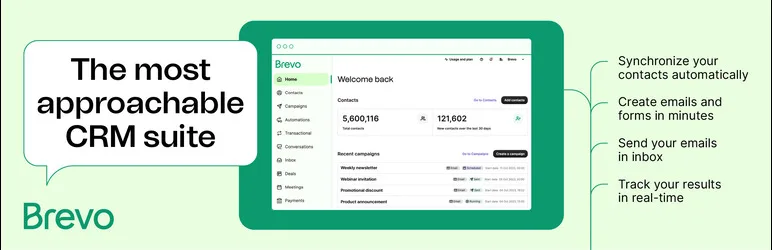
Brevo (formerly Sendinblue) bills on emails sent rather than subscribers stored, which is unusual and often cheaper if you keep a large list but email it selectively. The account also includes SMS, a light CRM, and transactional email, so a small business can text and email customers from one place. The WordPress connector has 100,000+ active installs.
Strengths
- Email and SMS from a single account.
- Billed on sends, which is kinder to a big but quiet list.
- Managed deliverability on Brevo’s infrastructure.
Weaknesses
- The free plan caps the number of emails you can send per day.
- The interface can feel busy, and automation isn’t the deepest here.
Best for: small businesses that want email and SMS and prefer to pay for what they send.
4. Mailchimp: the fast, safe start

Mailchimp is where most people begin, and its ease of setup earns that. The most popular WordPress connector, MC4WP, has over a million active installs, and Mailchimp’s official WooCommerce plugin adds another 200,000+. In support, we see people start here happily and only feel the pricing later, once the list grows.
Strengths
- The fastest, friendliest start, with the widest third-party integration support.
- Templates that look fine straight out of the box.
Weaknesses
- Cost climbs sharply at scale, and it counts unsubscribed and archived contacts in ways that surprise people at billing time.
- Automation covers basic sequences, but you’ll outgrow it for real journeys.
Best for: beginners who value the widest integration support over price.
5. MailerLite: clean and affordable
MailerLite hits a sweet spot: a clean editor, enough automation for most senders, landing pages and popups included, and pricing that stays gentle as you scale. It’s where many creators end up after finding Mailchimp fiddly or costly. The official signup-forms plugin sits at 100,000+ active installs.
Strengths
- Clean and uncluttered, and affordable as the list grows.
- Landing pages and popups built in.
Weaknesses
- Simpler automation, so you can hit a ceiling on complex branching logic.
- Account approval is strict, so keep your list clean.
Best for: creators and small businesses who want a clean tool that doesn’t cost much.
6. Omnisend: made for WooCommerce

Omnisend is built for stores. Abandoned-cart recovery, welcome and post-purchase sequences, product-recommendation blocks, and win-back campaigns all live in the same automations, with SMS in the same flows. The WooCommerce connector has 40,000+ active installs, and its ecommerce features are a clear step above those of general-purpose tools.
Strengths
- Ecommerce automation and SMS in one flow.
- Deep WooCommerce data: products, carts, and orders drive the campaigns.
Weaknesses
- Overkill for content publishers who mostly send articles.
- The store-focused feature set is more than a plain newsletter needs.
Best for: WooCommerce stores that want ecommerce automation and SMS together.
7. The Newsletter plugin: free and unlimited

The Newsletter plugin keeps things simple and, unusually, stays free for unlimited subscribers. It runs inside WordPress, so you collect subscribers, build lists, and send campaigns, with premium add-ons for extras like automation and richer analytics. At 200,000+ active installs, it’s a real favorite among budget-conscious site owners.
Strengths
- Genuinely free for unlimited subscribers.
- Runs inside WordPress, so you own the data.
Weaknesses
- You own deliverability, so pair it with a proper sending service.
- The interface feels dated, and several features you’d expect built in live behind paid add-ons.
Best for: budget-conscious users who want to stay in WordPress with no per-subscriber fee.
Also worth considering
These didn’t make the primary list, but each is the right answer for a specific need.
- Kit (formerly ConvertKit), 40,000+ installs, is organized around tags rather than lists, which fits how creators work. Great for course sellers and newsletter writers; not aimed at ecommerce.
- ActiveCampaign has the deepest automation here (multi-step journeys, conditional logic, lead scoring). It costs more, has no free tier, and has a real learning curve. Buy it if you’ll actually build the automations.
- Klaviyo, 100,000+ installs, is ecommerce-first, tying email and SMS to purchase behavior with strong segmentation. Overkill and overpriced for a plain newsletter, excellent for a serious store.
- HubSpot, 200,000+ installs, bundles a CRM, forms, live chat, and email in one free-to-start ecosystem. Compelling when your sales process goes past newsletters into lead nurturing, expensive at the advanced tiers.
- Constant Contact is one of the easiest platforms to learn, with strong event tools and responsive support. Basic automation, but that can matter less than hand-holding for a non-technical small business.
Deliverability is the part most reviews skip
You can pick the best tool on this list and still land in spam if the sending side is wrong. Here’s the path every email takes, and where authentication is checked:
Your WordPress site  →  Sending service (SMTP or API)  →  Recipient's mail server  →  Inbox
                                                        ↑ SPF, DKIM, and DMARC checked here
The receiving mail server (Gmail, Yahoo, and the rest) checks three DNS records for your sending domain before it decides where to put your message:
- SPF lists which servers are allowed to send for your domain.
- DKIM signs your messages so they can’t be tampered with in transit and can be traced back to you.
- DMARC ties the two together and tells receivers what to do with mail that fails. It’s now required, even at the lenient
p=nonepolicy, for bulk senders to Gmail and Yahoo.
Two practical consequences. First, sending bulk email straight from your WordPress host is a bad idea. Shared hosting IPs have poor reputations, often get rate-limited, and rarely handle authentication cleanly. For self-hosted tools like FluentCRM, the Newsletter plugin, or MailPoet on your own SMTP, route sending through a real service such as Amazon SES or Postmark, where SPF, DKIM, and DMARC are properly set up. Second, whatever you send, keep one-click unsubscribe enabled and your spam-complaint rate under 0.3%, because Gmail now watches that number.
SaaS platforms (Brevo, Mailchimp, and the rest) handle most of this for you on their infrastructure, which is a real part of what you’re paying for. Self-hosted tools give you more control and lower cost in exchange for owning it yourself.
Performance: what it does to your site
This matters more the bigger your list gets, especially for self-hosted tools that run sending on your own server.
- Background processing. Good tools send in the background via a proper queue rather than blocking a page load while a batch runs. FluentCRM and MailPoet send in batches so a campaign doesn’t stall your site.
- WP-Cron vs real cron. WordPress’s built-in scheduler only runs when someone visits the site, so on a low-traffic site scheduled sends can drift. Pointing WP-Cron at a real server cron job fixes the timing.
- Custom database tables. Tools that store contacts and stats in their own tables, rather than piling everything into
wp_postmeta, stay fast as the list grows into the tens of thousands. It’s a quiet detail that separates tools built for scale from tools that creak.
If you’re an agency putting a tool on client sites, these are the questions that decide whether you get support tickets six months later.
Whatever you pick, keep it fed
Picking the email tool is only half the job. The other half is getting your WordPress data into it and keeping it up to date, and this is where many setups quietly fall apart. Someone registers, buys something in WooCommerce, fills in a Gravity Forms or WPForms lead form, or signs up through a membership plugin. Does that person automatically land in your email tool, tagged and on the right list? For many sites, the honest answer is “only if I remember to export a CSV,” and that stops happening by week two.
That gap is why we built FlowSync. It monitors events on your site and syncs contacts to your email platform in the background via Action Scheduler, so signups, customers, and leads arrive tagged and on the right list without manual exports. It connects to most of the tools in this guide, including MailPoet, FluentCRM, Brevo, Mailchimp, MailerLite, and more. The free version is on WordPress.org.
If you chose MailPoet or FluentCRM, you may not need it, since those already live inside WordPress and see your data directly. It earns its place when your email tool is a separate service.
Which should you choose?
- Want everything inside WordPress? → MailPoet
- Want to own your data and keep costs flat? → FluentCRM
- Running a WooCommerce store? → Omnisend
- Need email and SMS together? → Brevo
- Sending a straightforward newsletter? → MailerLite (paid) or the Newsletter plugin (free)
- Building genuinely complex automations? → ActiveCampaign
FAQ
Is Mailchimp still worth using in 2026? For getting started, yes. It’s the fastest to set up and integrates with almost everything. The reason people move away is cost as the list grows, plus the way it counts archived and unsubscribed contacts. If you’re small and want to launch today, it’s fine. If you’re planning a big list, price it against Brevo (billed per send) or a self-hosted tool first.
Can WordPress send newsletters without a third-party service? Yes. Self-hosted plugins like MailPoet, FluentCRM, and the Newsletter plugin let you build and send from inside WordPress. But you still shouldn’t send bulk email directly through your web host. Connect a sending service, such as Amazon SES or Postmark, so your email is authenticated and delivered.
Which email plugin is best for WooCommerce? Omnisend for ecommerce automation and SMS, or Klaviyo if you want deeper data and segmentation. If you’d rather keep everything in wp-admin, MailPoet handles WooCommerce emails natively.
What’s the difference between FluentCRM and MailPoet? Both are self-hosted, but MailPoet is simpler and newsletter-first, with a gentle learning curve, while FluentCRM is a fuller CRM with stronger automation, tagging, and contact management. MailPoet is easier to start with; FluentCRM scales better and keeps costs flatter on large lists.
Do I need Amazon SES? Not specifically SES, but if you use a self-hosted plugin, you do need a real sending service behind it (SES, Postmark, SendGrid, or similar). SES is popular because it’s cheap at volume. SaaS platforms include sending, so you don’t add one.
Is a self-hosted email marketing plugin better? It depends on what you value. Self-hosted (FluentCRM, MailPoet, Newsletter) keeps your data in WordPress and your costs flat, in exchange for setting up and owning deliverability. SaaS (Brevo, Mailchimp, MailerLite) provides managed infrastructure and easier deliverability in exchange for a per-subscriber or per-send billing plan that scales with you.
Should I still care about open rates? As a rough trend line, sure. As a precise number, no. Apple Mail Privacy Protection inflates them. Judge campaigns on clicks, conversions, and revenue per recipient instead.
Final thoughts
There isn’t a single best WordPress email marketing plugin. There’s the one that fits how you work and what you can spend. If you’re just starting out, Brevo and MailerLite offer a lot for little. If you run WooCommerce, Omnisend is built for you. If you want to own your list and keep costs flat, FluentCRM is the self-hosted answer. And if you want everything inside WordPress, MailPoet is still one of the strongest options.
Whatever you choose, two things decide whether it actually works: sending that authenticates properly so your email lands, and a reliable way to get your WordPress signups, customers, and leads into the tool without manual exports. Get those right, and the plugin you picked can do its job.
FlowSync is free on WordPress.org if you want the syncing handled for you. If you’re considering a tool and want a second opinion on how it integrates with WordPress, let us know in the comments or by opening a support ticket.

Jannah
Part of the FlowSync team, writing about practical WordPress automation and workflow design.