If you use Beehiiv for newsletters and audience growth, one of the biggest challenges is keeping your WordPress subscribers updated automatically.
New users register on your website, but they never make it into Beehiiv.
Customers purchase products, but newsletter onboarding never starts.
Members join your site, but your publication audience never updates properly.
A lot of WordPress site owners manage this manually at first. They export users from WordPress, upload CSV files into Beehiiv, and constantly manage subscribers by hand.
That usually works for smaller websites.
Once your site starts growing, manual syncing becomes difficult to maintain.
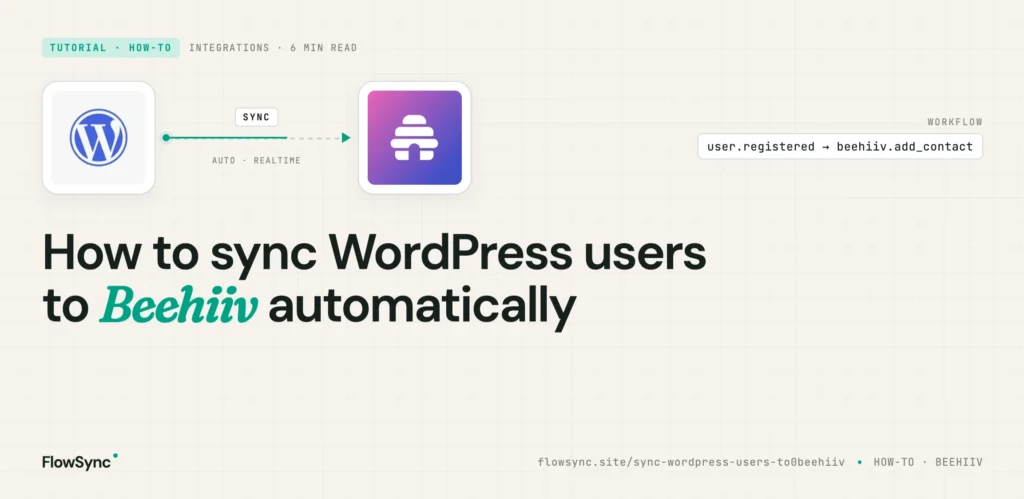
In this guide, I will show you how to automatically sync WordPress users to Beehiiv using FlowSync.
You will learn how to:
- Connect WordPress to Beehiiv
- Automatically sync subscribers
- Segment users based on website activity
- Automate WooCommerce and membership workflows
- Keep your newsletter audience updated automatically
FlowSync is designed specifically for WordPress CRM and email automation workflows. Instead of relying on manual exports, it reacts to events happening on your website and syncs contacts automatically.
Why Manual Beehiiv Syncing Becomes a Problem
Here is a common example.
You run a content website or membership platform.
When somebody signs up, you want to:
- Add them to Beehiiv
- Start a welcome email sequence
- Segment them properly
- Track subscriber growth automatically
If this process is manual, problems eventually appear.
Some subscribers are forgotten.
Some users receive the wrong newsletter campaigns.
Some expired members remain inside premium subscriber groups.
Over time, your audience becomes difficult to manage.
Automation fixes this by connecting WordPress events directly to Beehiiv.
Instead of manually updating subscribers every week, the workflow runs automatically in the background.
What FlowSync Automates
FlowSync focuses on WordPress CRM automation and audience syncing.
Typical Beehiiv workflows include:
- Add new WordPress users to Beehiiv
- Sync WooCommerce customers automatically
- Add membership users to newsletter segments
- Trigger onboarding campaigns
- Segment subscribers by purchased products
- Sync leads from WordPress forms
- Remove expired or inactive users automatically
The workflow structure is simple:
- Trigger
- Condition
- Action
For example:
- Trigger: User registers
- Condition: User role equals Subscriber
- Action: Add subscriber to Beehiiv publication
This keeps workflows easier to manage later.
Step 1: Install FlowSync
First, install and activate FlowSync on your WordPress site.
After activation, open the FlowSync dashboard inside your WordPress admin area.
You should see sections like:
- Workflows
- Integrations
- Logs
- Settings
Step 2: Connect Beehiiv to WordPress
Next, connect your Beehiiv account.
Go to:
FlowSync → Integrations
Find Beehiiv and click Configure.
You will need your Beehiiv API key.
To get it:
- Log into Beehiiv Dashboard
- Open your account settings
- Go to the API section
- Generate an API key
- Copy the key
Paste the API key into FlowSync and save the settings.
Once connected, FlowSync will be able to create and update subscribers automatically inside Beehiiv.
Step 3: Create Your First Workflow
Now let’s build a simple automation.
We will create this workflow:
When a user registers on WordPress, automatically add them to Beehiiv.
Go to:
FlowSync → Workflows → Add New
Choose a Trigger
Select:
- WordPress User Registered
This means the workflow will run whenever a new user account is created.
Add Conditions (Optional)
Conditions allow you to filter which users should be synced.
For example:
- Only sync Customers
- Only sync WooCommerce buyers
- Only sync Members
- Only sync users from a specific membership plan
If you want all users synced, you can skip this step.
Add the Beehiiv Action
Next, add an action.
Choose:
- Add Subscriber to Beehiiv
Then select the Beehiiv publication or segment you want the user added to.
You can also map fields such as:
- Email address
- First name
- Last name
Save the workflow and activate it.
From this point onward, new WordPress users will automatically be synced to Beehiiv.
Membership Site Example
Suppose you run a membership website using ProfilePress.
You want:
- Active members added to premium newsletter segments
- Trial users added to onboarding campaigns
- Expired members removed automatically
You can automate all of this using workflows.
Workflow 1: Active Members
- Trigger: Subscription Activated
- Condition: Membership Plan = Premium
- Action: Add user to Premium Newsletter segment
Workflow 2: Expired Members
- Trigger: Subscription Expired
- Action: Remove user from Premium Newsletter segment
This keeps your Beehiiv audience cleaner automatically.
WooCommerce Example
WooCommerce automation is another common use case.
Example workflow:
- Trigger: Order Completed
- Condition: Product Category = Digital Products
- Action: Add customer to Product Buyers segment
This helps with:
- Product-based segmentation
- Customer follow-up campaigns
- Upselling related products
- Audience targeting
Instead of emailing every subscriber the same way, you can personalize campaigns based on purchase behavior.
Form Lead Automation
You can also sync WordPress form submissions directly into Beehiiv.
For example:
- Trigger: WPForms form submitted
- Action: Add subscriber to Beehiiv
This works well for:
- Newsletter signup forms
- Ebook downloads
- Lead generation forms
- Consultation requests
Instead of manually importing leads later, subscribers appear automatically inside Beehiiv.
Common Mistakes to Avoid
Putting Everybody Into One Audience
A lot of people place every subscriber into one large audience.
That becomes difficult to manage later.
Instead, segment subscribers based on:
- Products purchased
- Membership status
- User roles
- Form submissions
- Customer lifecycle stage
Better segmentation usually improves newsletter engagement.
Forgetting Cleanup Workflows
Adding subscribers is only part of the process.
You should also automate:
- Removing expired members
- Removing cancelled subscriptions
- Moving inactive subscribers into re-engagement campaigns
This keeps your audience cleaner over time.
Not Testing Your Workflow
Before using a workflow on a live website, always test it properly.
Create a test account and confirm:
- The subscriber appears in Beehiiv
- Fields sync correctly
- The correct publication or segment is used
- Duplicate subscribers are not created
Why Native WordPress Automation Helps
Some site owners connect WordPress and Beehiiv using external automation platforms.
That setup can work, but it also introduces another layer that can fail.
With native WordPress automation:
- Workflows run closer to your actual website data
- Membership plugins integrate directly
- User events trigger immediately
- Subscriber syncing happens automatically inside WordPress
- There are fewer moving parts to troubleshoot
FlowSync focuses specifically on WordPress CRM workflows and audience automation instead of trying to become a broad automation platform.
FAQ
Can I sync existing WordPress users to Beehiiv?
Yes.
You can manually run workflows to sync existing users into Beehiiv.
This is useful when connecting Beehiiv to an already active website.
Does this work with WooCommerce?
Yes.
WooCommerce customers can be synced automatically based on products, categories, and orders.
Can I remove subscribers automatically?
Yes.
You can create workflows that remove subscribers when memberships expire or subscriptions are cancelled.
Does this require coding?
No.
The workflows are created directly inside WordPress using the FlowSync interface.
Can I sync WordPress forms to Beehiiv?
Yes.
Supported WordPress form plugins can automatically send leads into Beehiiv.
Final Thoughts
As your WordPress site grows, manually managing subscriber data becomes difficult.
Users register, memberships change, products are purchased, and customer activity constantly changes.
Without automation, your Beehiiv audience eventually becomes outdated.
A proper WordPress-to-Beehiiv workflow helps you:
- Reduce manual work
- Improve audience segmentation
- Keep subscriber data updated
- Trigger campaigns faster
- Build cleaner onboarding and retention flows
The goal is simple.
When something important happens on your WordPress site, your newsletter platform should react automatically.
That is exactly what FlowSync is designed to do.

FlowSync
FlowSync syncs members, customers, and form leads to Brevo, Mailchimp, HubSpot, Klaviyo, and more based on activity happening on your WordPress site.